Voicemail Logbook: Optimizing KDP Interiors for Professional Utility
In an era dominated by digital automation, the tangible reliability of a physical record remains unmatched for specific professional workflows. A Voicemail Logbook serves as more than just a place to jot down phone numbers; it is a critical compliance tool, a customer service safeguard, and a productivity anchor for busy professionals. For creators and publishers utilizing Amazon KDP, offering a high-quality logbook interior addresses a genuine market need for organized communication tracking. However, the difference between a bestseller and a returned product often lies in the technical execution of the interior file. Understanding the precise specifications and common pitfalls of designing these functional books is essential for delivering value to your end user.
The Functional Necessity of Accurate Logging
Before diving into design specifications, it is vital to understand why users seek out this specific type of logbook. Professionals in healthcare, legal services, property management, and freelance consulting often require physical documentation of verbal communications. Digital systems can fail, batteries die, and software updates can alter data fields unexpectedly. A dedicated Voicemail Logbook provides an immutable record that supports accountability.
When evaluating or creating these interiors, recognize that the user is likely operating under time pressure. They are not looking for artistic flair; they are looking for rapid data entry and retrieval. If the layout impedes speed or legibility, the book fails its primary purpose. This functional requirement dictates every design decision, from margin width to line spacing. Publishers who treat this as a generic notebook rather than a specialized tool often miss the mark on customer satisfaction.
Critical Specification Mistakes in KDP Interiors
The most frequent point of failure for low-content and medium-content books on KDP is ignoring strict printing guidelines. When working with a standard 8.5″ x 11″ Inches trim size, precision is non-negotiable. A common error involves misunderstanding bleed settings. The specification for this logbook is No Bleed. This means all content must remain within the safe zone, typically requiring a minimum margin of 0.375 inches on the outside edge and significantly more on the gutter (binding) side.
Designers frequently create beautiful headers or footer graphics that extend to the page edge, only to have them cropped during printing or rejected during the upload process. Even if approved, text placed too close to the binding becomes unreadable when the book is open flat. For a 110-page document, the cumulative effect of poor margin planning results in a frustrating user experience where notes disappear into the spine crease. Always verify that your PDF, AI, or JPEG source files adhere strictly to no-bleed safety margins before finalizing the interior.
Balancing Page Count and Usability
A 110-page count is a strategic choice for a voicemail tracker, but it requires careful consideration of paper opacity and book thickness. KDP standard color paper has limitations. If you design dense, heavy-ink tables or dark background elements, bleed-through becomes a significant issue. Users cannot effectively use the reverse side of a page if the previous entry shows through.
To avoid this, prioritize clean, high-contrast layouts with ample white space. Avoid using solid black backgrounds for table headers. Instead, use thin lines or light gray shading that prints cleanly without saturating the paper. Furthermore, 110 pages provide enough volume for several months of daily logging without making the book cumbersome. Exceeding this page count unnecessarily increases printing costs and reduces portability, while falling short may force users to repurchase too frequently. Stick to this sweet spot unless you have validated data suggesting otherwise.
The Importance of Unique Page Design
Market saturation is a reality for KDP publishers, but quality differentiation is the solution. Using stock templates found on free resource sites is a shortcut that leads to poor reviews. Customers are increasingly savvy; they recognize recycled interiors instantly. A Unique Page layout signals professionalism and respect for the buyer’s needs.
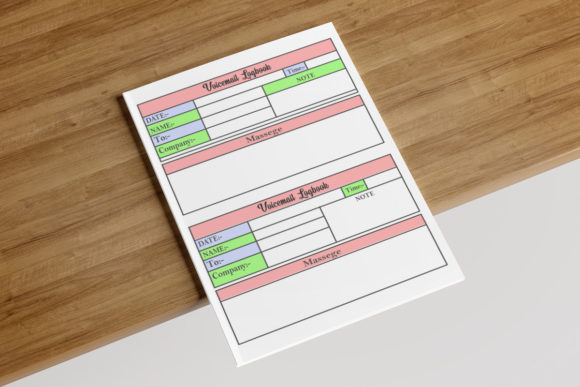
Customization is key. Rather than a generic "Message" box, consider the specific workflow of voicemail logging. Include dedicated fields for:
- Date and Time: Essential for chronological tracking and legal timestamps.
- Caller Name and Number: Distinctly separated for quick scanning.
- Action Required Checkbox: Allows for visual prioritization during review.
- Follow-Up Status: A space to mark calls as resolved, pending, or escalated.
- Notes Section: Adequate lined space for detailed transcription.
By customizing these elements, you transform a blank notebook into a specialized productivity system. This level of detail justifies a higher price point and encourages positive feedback regarding the book's utility.
File Format and Resolution Best Practices
Technical quality directly impacts perceived value. While KDP accepts multiple formats, High-resolution PDF is the industry standard for crisp text and sharp lines. Submitting low-resolution JPEGs for multi-page documents often results in pixelated text, which causes eye strain during extended use. Vector-based formats like AI are excellent for editing and scaling, but always export to a flattened, high-res PDF for final submission to ensure font embedding and layout stability.
A frequent oversight is failing to outline fonts or embed them correctly. If your unique design uses a specific typeface that isn't embedded, KDP may substitute it, destroying your carefully planned alignment. Always check the "Easily can edit" claim against reality. Source files should indeed be editable for future updates, but the deliverable uploaded to KDP must be locked and optimized. Ensure your resolution is at least 300 DPI for any raster elements, though vector text is infinitely scalable and preferred for logbooks.
Evaluating Quality Before Publishing or Buying
Whether you are a creator preparing a new title or a consumer selecting a logbook for your business, due diligence prevents disappointment. For publishers, this means ordering a physical proof copy. Never rely solely on the digital previewer. Check the gutter margin physically; open the book flat and write in the innermost column. If your hand cramps or the pen skips due to the curve of the binding, redesign the interior.
For buyers, scrutinize the "Look Inside" feature or sample pages. Verify that the writing space is sufficient for your handwriting style. Some logbooks cram too many entries per page to maximize page count, resulting in cramped, unusable fields. Look for clear hierarchy in the design. Can you distinguish between the caller's name and the message body at a glance? Does the paper quality mentioned in reviews support your preferred pen type?
Ultimately, a successful Voicemail Logbook bridges the gap between analog reliability and modern organizational standards. By adhering to strict 8.5″ x 11″ no-bleed specifications, maintaining high-resolution output, and prioritizing unique, user-centric page layouts, you ensure the final product serves its intended function flawlessly. Avoiding common formatting errors and focusing on practical utility creates a resource that professionals can trust, turning a simple stationery item into an indispensable business asset.