Event Planner: A Comprehensive Guide to KDP Interior Design and Customization
In the dynamic world of self-publishing and professional organization, the right tools can make the difference between a chaotic project and a seamless execution. For creators, business owners, and organizational enthusiasts, an Event Planner serves as more than just a notebook; it is a structured framework for success. When utilizing Amazon’s Kindle Direct Publishing (KDP) platform or creating custom organizational tools for personal use, understanding the technical specifications and practical applications of these planners is essential. This guide explores the nuances of designing, customizing, and utilizing a high-quality Event Planner tailored for both digital distribution and physical utility.
The Foundation: Understanding Technical Specifications
Before diving into the creative aspects of an Event Planner, one must understand the structural parameters that define its usability and print quality. Whether you are designing for KDP or personal printing, adherence to specific dimensions and file standards ensures a professional result.
Dimensions and Page Count
The industry standard for comprehensive planning documents is 8.5″ x 11″ inches. This letter-size format provides ample surface area for detailed scheduling, vendor contact lists, budget tracking, and brainstorming sketches without feeling cramped. For a functional Event Planner, a page count of 110 pages strikes an optimal balance. It offers sufficient depth to cover multiple events or a full year of planning while remaining portable enough to carry to venue walkthroughs and client meetings. This thickness also meets the minimum requirements for spine text on KDP, allowing for better shelf visibility if published physically.
Bleed Settings and Margins
A critical technical consideration is the No Bleed setting. In publishing terms, "bleed" refers to artwork that extends beyond the trim edge of the page. Selecting a No Bleed configuration means all content, including borders, background colors, and text, must remain within a safe margin zone (typically 0.25" to 0.5" from the edge). This approach is often preferred for Event Planners because it guarantees that no crucial checklist items or writing spaces are accidentally trimmed off during the manufacturing process. It simplifies the design workflow and reduces the risk of formatting errors when uploading PDF files to KDP.
File Formats and Editability
Versatility is key when working with planner interiors. The ability to adapt a template to specific niches—such as weddings, corporate conferences, or birthday parties—relies heavily on the source file formats provided. A robust Event Planner package should include three distinct formats:
- PDF: The universal standard for printing and KDP upload. High-resolution PDFs ensure that lines are crisp and text is sharp at any zoom level. This is the final output format that preserves layout integrity across different devices and printers.
- AI (Adobe Illustrator): This vector-based format allows for infinite scalability and deep customization. Users can adjust line weights, change fonts, move elements, and restructure entire spreads without losing quality. It is the professional choice for those who want to create a truly unique product.
- JPEG: While less common for full-book editing, high-resolution JPEGs are invaluable for marketing. They serve as preview images for Etsy listings, Amazon A+ content, or social media promotion, showcasing the interior layout to potential buyers before they purchase.
The emphasis on being easily customizable cannot be overstated. A static template limits your market reach. By providing editable source files, an Event Planner becomes a foundational asset that can evolve with changing trends and specific client needs.
Design Philosophy: Unique Pages and User Experience
Functionality drives the design of any successful planner. Repetitive, generic layouts lead to user fatigue. A superior Event Planner features unique page designs tailored to specific phases of event management. Rather than recycling the same weekly spread fifty times, effective interiors offer variety:
- Vision Boards and Concept Pages: Unlined or dotted spaces for mood boarding and initial ideation.
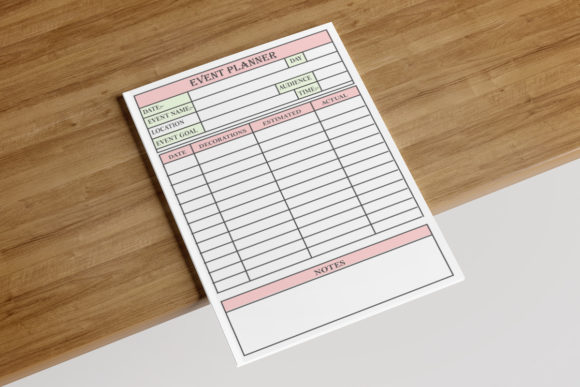
- Detailed Budget Trackers: Structured tables with columns for estimated vs. actual costs, deposit dates, and payment status.
- Vendor Comparison Charts: Side-by-side evaluation grids to help decision-making.
- Day-of Timelines: Minute-by-minute scheduling templates specifically designed for event flow rather than standard hourly appointments.
- Post-Event Review: Reflection pages to document lessons learned and gather feedback for future improvements.
This variety keeps the user engaged and ensures that every aspect of event coordination has a dedicated space. High-resolution graphics and clean typography further enhance the experience, making the planner not just a tool, but a pleasure to use. When users feel confident in their organizational system, they are more likely to recommend the product or leave positive reviews.
Practical Applications and Target Audience
Who benefits most from a professionally designed Event Planner? The applications extend far beyond casual party planning.
For KDP Publishers and Digital Creators
Entrepreneurs in the low-content book niche seek high-quality, easily editable interiors to differentiate themselves in a saturated market. Using a pre-designed, unique Event Planner template saves hundreds of hours of design time while providing a professional foundation. Because these templates come in AI and PDF formats, publishers can quickly rebrand them, add niche-specific sections (e.g., "Quinceañera Planner" or "Corporate Retreat Organizer"), and publish under their own imprint.
For Professional Event Coordinators
Industry professionals require reliability. A customized Event Planner serves as a branded client deliverable or an internal operations manual. By editing the AI files, coordinators can insert their logo, brand colors, and proprietary checklists, creating a cohesive brand experience. The 8.5x11 size is perfect for printing in-house or through local vendors for client welcome packets.
For DIY Enthusiasts and Small Business Owners
Individuals planning significant life events or small business owners managing recurring workshops benefit from the structure without the cost of hiring a full-service planner. The comprehensive nature of a 110-page interior guides them through processes they may be unfamiliar with, reducing stress and preventing costly oversights.
Evaluating Suitability: Strengths and Considerations
While a standardized Event Planner template offers immense value, users should evaluate it against their specific needs to ensure alignment.
Strengths
- Time Efficiency: Eliminates the need to design from scratch. The structure is already tested and optimized for print.
- Professional Quality: High-resolution assets and proper margin settings prevent amateurish results.
- Scalability: Vector files allow adaptation for other products like digital downloads, tablet planner inserts, or smaller A5 versions.
- Compliance: Pre-set No Bleed and correct dimensions reduce KDP rejection rates.
Considerations and Limitations
Users must recognize that a template is a starting point, not a finished product. To succeed on KDP or in professional settings, customization is mandatory. Simply uploading a stock template without modification can lead to duplicate content issues on Amazon or a lack of brand identity. Additionally, those unfamiliar with Adobe Illustrator may face a learning curve when attempting to edit AI files. However, many designers offer basic tutorials, and the long-term flexibility outweighs the initial skill investment.
Furthermore, while 110 pages is ideal for many, some niche events may require fewer or more pages. Users should assess whether the included unique pages align with their target audience's workflow. A wedding planner might need extensive seating chart templates, whereas a corporate event planner might prioritize AV equipment checklists. The ability to add or remove pages via the editable source files mitigates this limitation, but it requires proactive assessment.
Best Practices for Implementation
To maximize the value of your Event Planner interior, follow these practical guidelines:
- Always Preview Before Publishing: Use KDP’s previewer tool or print a physical proof copy to verify margins, especially with No Bleed settings. Ensure writing spaces have adequate padding from the gutter.
- Customize Metadata and Content: If selling on KDP, rewrite titles, subtitles, and descriptions. Add unique introductory content or bonus pages to distinguish your version from others using similar base templates.
- Test Print Quality: Even with high-resolution files, paper type affects outcome. Test on both white and cream paper if offering both options, as ink absorption varies.
- Leverage Multiple Formats: Use JPEGs for social media teasers, PDFs for digital delivery or print, and AI files for future product line expansions.
- Gather User Feedback: If using the planner internally or selling directly, ask users which pages they skip and which they duplicate. This data informs future iterations and customizations.
Conclusion
An Event Planner designed with precision, flexibility, and user-centric features is an invaluable asset in today’s organized chaos. Whether you are a KDP publisher seeking a competitive edge, a professional coordinator streamlining operations, or an individual taking control of a major celebration, the right interior template lays the groundwork for success. By understanding the importance of 8.5x11 dimensions, No Bleed safety zones, multi-format accessibility, and unique page design, users can transform a simple document into a powerful organizational engine. Remember that true value emerges not from the template itself, but from how thoughtfully it is adapted to meet real-world needs. Invest time in customization, respect technical standards, and prioritize the end-user experience to create an Event Planner that stands out in both function and form.